Claude in VS Code Copilot Chat: Why This One Dropdown Quietly Changes Everything for Developers
TL;DR
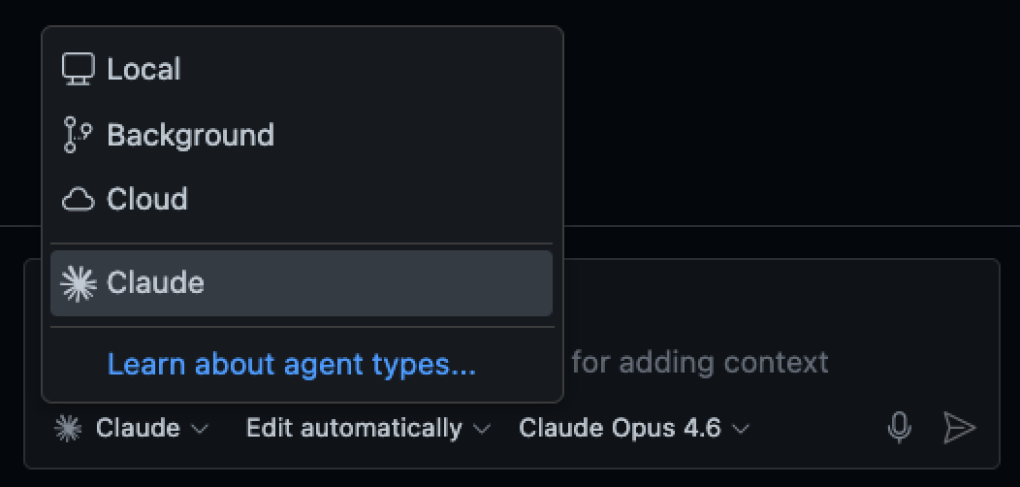
VS Code Copilot Chat now supports Claude as a first-class model option. This isn’t cosmetic—it’s a strategic upgrade. Claude excels at long-context reasoning, large refactors, and understanding complex codebases. Use GPT models for speed. Switch to Claude for depth, safety, and architectural clarity.
The Moment You Noticed That “Claude” Option 👀
If you recently opened Copilot Chat in VS Code and saw Claude sitting next to the usual model options, your instinct was right:
This is not just another model toggle.
This is Microsoft quietly turning VS Code into a multi-model AI control plane.
Behind the scenes:
Microsoft is abstracting multiple frontier AI models
Anthropic’s Claude models are now directly accessible
Developers get choice without workflow disruption
That’s a big deal.
What Claude Actually Brings to Copilot (Beyond the Marketing)
Let’s skip buzzwords and talk operational advantages.
1. Massive Context Retention
Claude can comfortably reason across:
Large files
Multiple modules
Entire PRs
Monorepos
If GPT occasionally feels like it “forgets” earlier context—Claude doesn’t.
2. Structural Reasoning > Line-by-Line Guessing
Claude is exceptionally strong at:
Understanding why code exists
Inferring architectural intent
Explaining trade-offs, not just fixes
This makes it ideal for legacy systems and handovers.
3. Safer Refactors
When you ask Claude to refactor, it tends to:
Preserve public APIs
Respect implicit contracts
Flag risky changes instead of blindly applying them
For production systems, this matters more than speed.
Claude vs GPT in VS Code: A Practical Comparison
| Use Case | Claude | GPT-based Models |
|---|---|---|
| Large refactors | ✅ Best-in-class | ⚠️ Risky at scale |
| Understanding legacy code | ✅ Excellent | Good |
| Reviewing long PRs | ✅ Excellent | Moderate |
| Rapid prototyping | Good | ✅ Excellent |
| Small utilities | Good | ✅ Excellent |
| Brainstorming ideas | Good | ✅ Excellent |
Interpretation:
GPT optimizes velocity.
Claude optimizes correctness and comprehension.
When You Should Actively Switch to Claude
✅ Use Claude When:
Refactoring across multiple files
Reviewing a large pull request
Onboarding into an unfamiliar codebase
Translating specs or RFCs into implementation
Debugging non-obvious production issues
❌ Stick With GPT When:
Writing small helper functions
Generating UI snippets
Brainstorming features or names
Fast trial-and-error coding
Elite workflow:
GPT for speed → Claude for certainty
How Senior Developers Get the Most Out of Claude
Be Constraint-Driven
Claude thrives on precision.
Instead of:
“Refactor this service”
Say:
“Refactor this service to remove circular dependencies, keep the public API unchanged, and explain any trade-offs.”
The output quality difference is immediate.
Over-share Context (Seriously)
Paste:
Logs
Stack traces
Multiple files
Architectural notes
Claude’s performance improves with more input.
Ask for Reasoning, Not Just Code
Example:
“Why is this approach safer under concurrent load?”
Claude’s explanations are often as valuable as the solution.
Why This Matters Beyond VS Code (Big Picture)
This update signals a broader shift:
IDEs are becoming AI orchestration layers
Models are turning into interchangeable infrastructure
Developer leverage now comes from model selection skill
Soon, “Which model should I use?” will matter as much as:
Which framework
Which database
Which cloud provider
Final Verdict
Claude in VS Code Copilot Chat is not hype.
It’s risk reduction, context mastery, and architectural leverage.
If you’re:
Building SaaS
Maintaining production systems
Leading a team
Scaling codebases
This dropdown is not optional—it’s strategic.
